
What is GNS3? #
GNS3 (Graphical Network Simulator-3) is a powerful network simulation tool that allows users to design, configure, test, and troubleshoot virtual and real networks. It is widely used by network professionals, engineers, and students to simulate complex network topologies for learning and testing purposes. Key Features of GNS3:
-
Graphical Interface: GNS3 provides a drag-and-drop interface for creating and connecting virtual devices like routers, switches, firewalls, and more.
-
Real Device Emulation: It can emulate real network devices by running actual firmware images (e.g., Cisco IOS, Juniper Junos). This allows users to work with the same software they would use on physical hardware.
-
Integration with Real Networks: GNS3 can connect to real physical networks, allowing for hybrid setups that mix virtual and physical devices.
-
Multi-Vendor Support: GNS3 supports a wide range of network device vendors, including Cisco, Juniper, and others, making it versatile for different network environments.
-
Learning and Certification Preparation: GNS3 is popular among those studying for network certifications (like Cisco’s CCNA, CCNP) because it allows for hands-on practice without the need for expensive physical hardware.
Common Use Cases #
Network Design and Testing: GNS3 is used to design and test network configurations before deploying them in a production environment.
Learning and Training: It is widely used by students and professionals to practice network configurations, troubleshoot scenarios, and prepare for certification exams.
Software Testing: GNS3 can be used to test network-related software or features in a controlled environment before rolling them out to a live network.
Overall, GNS3 is an invaluable tool for anyone involved in networking, offering a flexible, cost-effective way to work with complex network scenarios.
My Current Gns3 VM Setup #
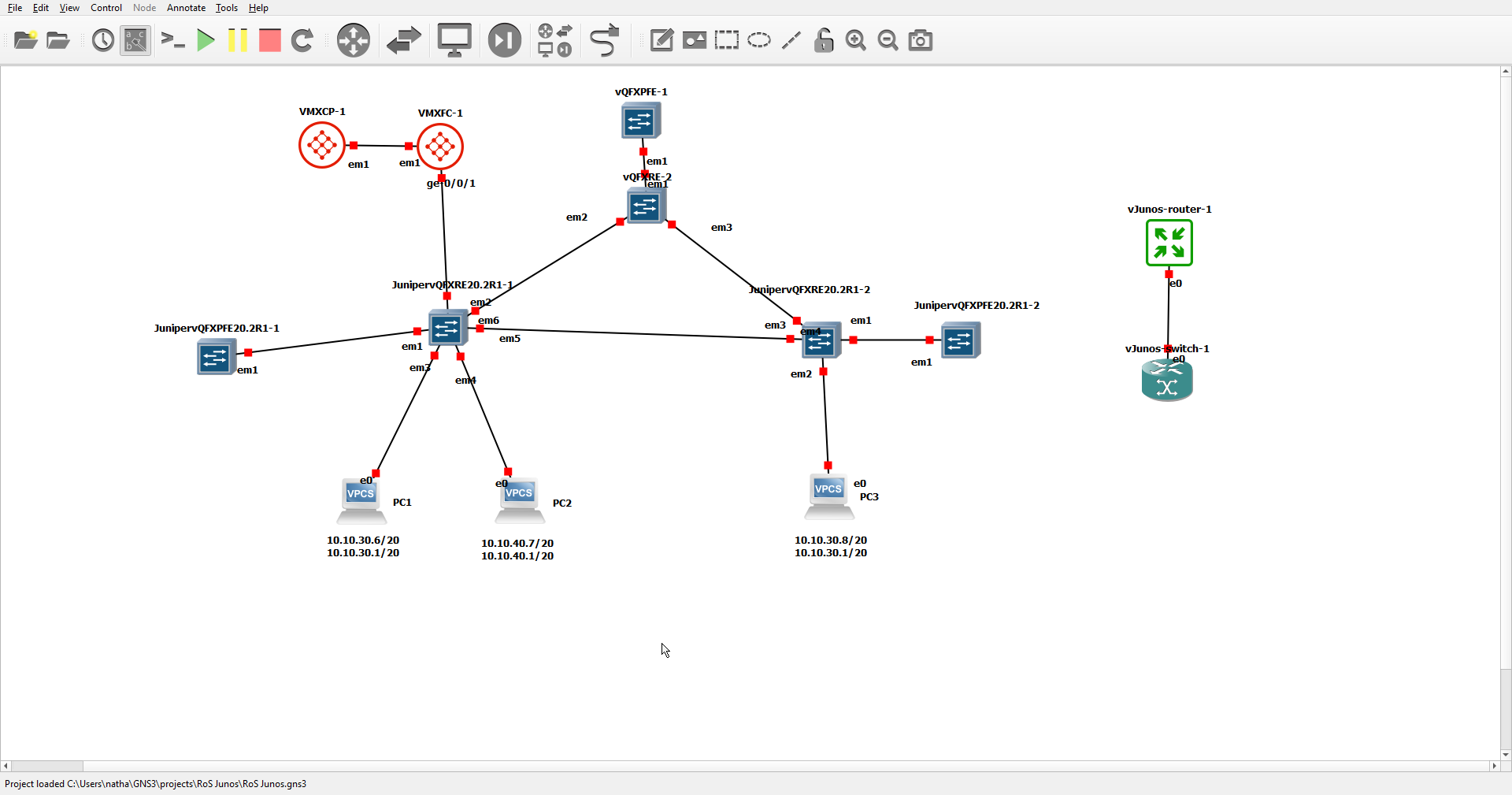
This is how I currently have my Gns3 setup. Some things to note:
- I am using my laptop
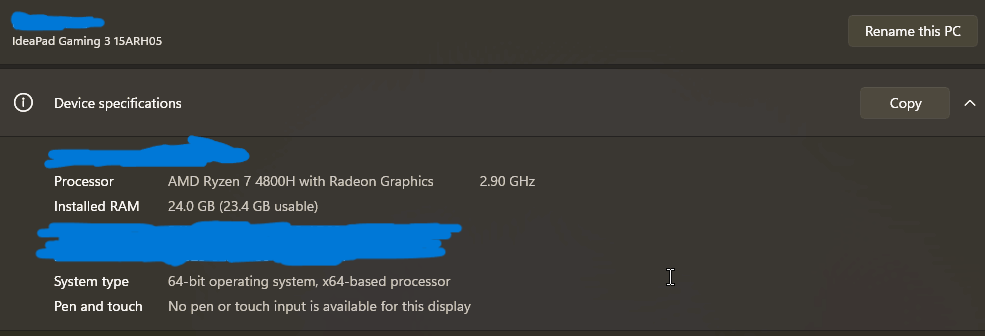
- I have been using Gns3 for about 3 months in total.
- I am primarily a web dev as opposed to a network engineer.
Enough preamble this is my current GNS3 VM setup
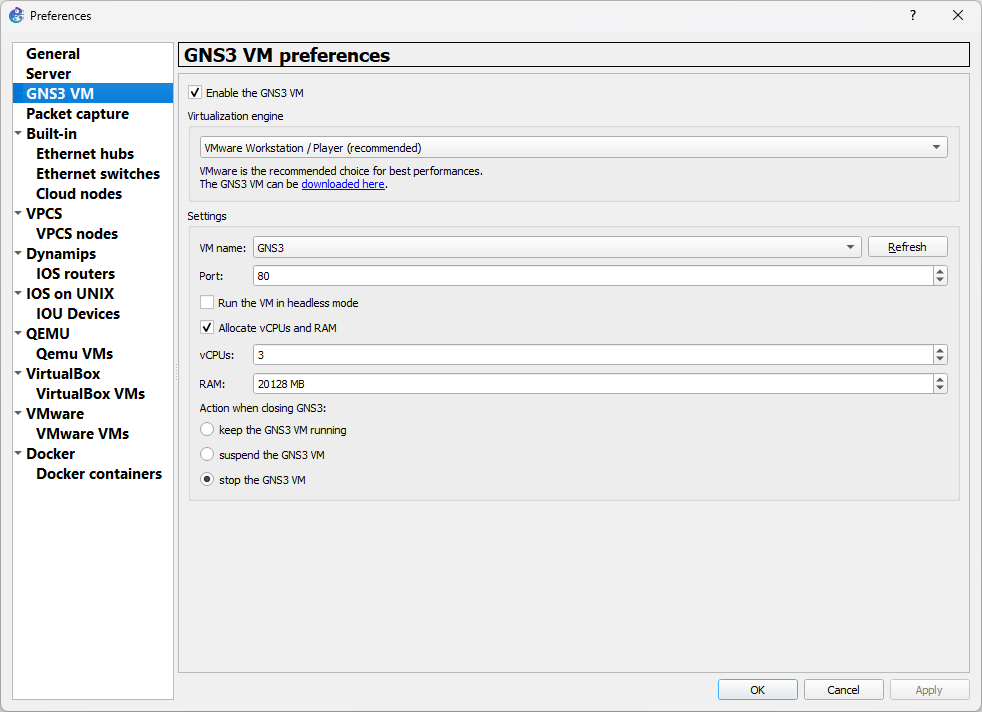
Who are Juniper and Cisco? #
Juniper Networks and Cisco Systems are two of the most prominent companies in the networking and telecommunications industry, providing hardware, software, and services that are essential for building and maintaining computer networks.
Juniper Networks #
-
Founded: 1996
Headquarters: Sunnyvale, California, USA
-
Specialization: Juniper Networks specializes in high-performance networking products, including routers, switches, network management software, and network security solutions. They are particularly known for their focus on service providers, data centres, and large enterprise networks. Their products are often used in large-scale networks that require robust performance and scalability.
-
Key Products: Juniper MX Series: High-performance routers used in service provider and enterprise networks. Juniper EX Series: Switches for enterprise networks. Junos OS: The operating system that powers most Juniper devices, known for its reliability and advanced features.
-
Reputation: Juniper is recognized for its innovation in networking technology, particularly in areas like routing and network security. They compete directly with Cisco in many market segments.
-
Cisco Systems #
-
Founded: 1984
-
Headquarters: San Jose, California, USA
-
Specialization: Cisco Systems is a global leader in networking technology, offering a wide range of products and services, including routers, switches, network security solutions, wireless networking, collaboration tools, and more. Cisco’s products are used in a vast array of industries, from small businesses to large enterprises, and in both public and private sectors.
-
Key Products: Cisco Catalyst Series: A range of switches used in enterprise and data center networks. Cisco ISR (Integrated Services Routers): Routers that combine routing, switching, and security in a single device, commonly used in branch offices. Cisco IOS: The Internetwork Operating System that runs on most Cisco routers and switches, widely used and known for its comprehensive networking capabilities.
-
Reputation: Cisco is the largest networking company in the world and is known for its extensive product range, reliability, and strong support for enterprise and service provider networks. Cisco certifications, such as CCNA and CCNP, are highly respected in the networking industry.
Comparison #
-
Market Focus: While both companies serve enterprise and service provider markets, Cisco has a broader range of products and a more extensive market reach, including small to medium-sized businesses. Juniper is more focused on high-performance networking and service providers.
-
Technology: Both companies are known for their advanced technology, but Cisco is often seen as more user-friendly, with a larger community and more extensive support. Juniper, on the other hand, is favoured for its performance and scalability in large networks.
In summary, Juniper and Cisco are industry giants in networking, each with its strengths and specializations. They are often chosen based on specific network requirements, existing infrastructure, and organizational needs.
What are Junos and IOS? #
Junos and IOS are the operating systems developed by Juniper Networks and Cisco Systems, respectively. They are designed to run on the networking hardware (such as routers, switches, and firewalls) produced by these companies.
Junos #
Developer: Juniper Networks Introduction: Junos was first released in 1998, not long after Juniper Networks was founded. Purpose: Junos is the operating system used across most of Juniper’s networking devices, including routers, switches, and security devices.
Key Features of Junos #
Unified Code Base: Junos uses a single, unified code base across all of Juniper’s networking products. This consistency simplifies the process of managing and updating devices. Modular Architecture: Junos has a modular architecture, which means that different processes (like routing, management, and interfaces) run independently. This improves stability and reliability, as one process crashing won’t necessarily bring down the whole system. Command-Line Interface (CLI): Junos CLI is known for being powerful and efficient, offering robust configuration and troubleshooting tools. It is structured in a hierarchical manner, making it intuitive for users once they are familiar with it. Security Features: Junos includes advanced security features, such as firewall capabilities, VPN support, and secure routing protocols, making it suitable for high-security environments.
IOS (Internetwork Operating System) #
Developer: Cisco Systems Introduction: IOS was introduced in the mid-1980s and has become one of the most widely used network operating systems in the world. Purpose: Cisco IOS runs on a vast range of Cisco networking devices, including routers, switches, and other networking equipment.
Key Features of IOS #
Wide Deployment: Cisco IOS is ubiquitous in networking environments due to Cisco’s dominant market position. It is used in a broad range of networks, from small businesses to large enterprises and service providers. Monolithic Architecture: Unlike Junos, Cisco IOS has a monolithic architecture, where all functions (routing, switching, security, etc.) are handled by a single process. This can be simpler but may also lead to stability issues if something goes wrong. Command-Line Interface (CLI): IOS CLI is one of the most widely recognized and used in the networking world. It provides a comprehensive set of commands for configuring, managing, and troubleshooting Cisco devices. The CLI is command-based, with a strong emphasis on familiarity with specific commands and syntax. Rich Feature Set: IOS supports a wide array of networking features, including various routing protocols (like OSPF, BGP), switching features, quality of service (QoS), VPNs, and more. Cisco frequently updates IOS to include the latest technologies and standards.
Comparison #
Usage: Both Junos and IOS are essential in their respective ecosystems. Network engineers working with Juniper devices will need to be proficient in Junos, while those working with Cisco devices will need to be proficient in IOS.
CLI Differences: While both operating systems use a CLI for configuration, they differ in syntax and structure. Junos has a more hierarchical and modular structure, which some users find easier to learn. Cisco IOS, with its command-based approach, is more straightforward but requires a good memory of commands and their options.
Stability and Modularity: Junos is often praised for its stability and modularity, as independent processes minimize the risk of system-wide crashes. IOS, with its monolithic architecture, is simpler but may require a full system reboot in case of certain issues.
In summary, Junos and IOS are critical components of Juniper and Cisco’s networking ecosystems, respectively. Both are powerful and feature-rich, but they differ in design philosophy and operational approach. Mastery of one or both is crucial for network professionals working with these technologies.
Main Differences between the two in Gns3 #
When using Junos and IOS in GNS3, the main differences reflect the distinct characteristics of these operating systems as they function within their respective ecosystems. Here are the key distinctions:
Device Emulation and Availability #
-
Junos (Juniper): In GNS3, Junos is typically emulated on virtual machines (VMs) or containers. You often need to use a vMX (virtual MX router) or vSRX (virtual SRX firewall) image to emulate Juniper devices. Setting up Junos in GNS3 can be more complex compared to IOS because it often involves configuring a virtual machine (usually through QEMU) and integrating it into GNS3. You may need a valid license or evaluation version for certain Junos features, depending on the image used.
-
IOS (Cisco): Cisco IOS is more straightforward to set up in GNS3. It often runs directly on GNS3 as a Dynamips image, which is a Cisco router emulator. Dynamips supports many IOS versions, making it easier to start with Cisco devices in GNS3. IOSv (IOS virtual) and IOS-XE (a more advanced version) are also available as virtual machines, but the process is generally easier compared to Junos. Cisco IOS images are more commonly available and require fewer resources to emulate, which makes them easier to work with in GNS3.
Command-Line Interface (CLI) and Configuration #
-
Junos (Juniper): The Junos CLI is structured and hierarchical. Commands are organized in a way that reflects the device’s configuration hierarchy. This can make it easier to navigate complex configurations. Junos has a strong emphasis on commit-based configurations, meaning that changes are not applied until you commit them. This allows for batch changes and rollback options if something goes wrong. The CLI commands and structure might take time to learn if you are more familiar with IOS, but Junos is considered intuitive once you understand the hierarchy.
-
IOS (Cisco): Cisco IOS uses a more linear and command-based CLI. It is well-known for its simplicity, where commands are entered in a sequence without the need for hierarchical navigation. Changes in IOS are applied immediately unless you use the configure replace or archive feature for rollback. The IOS CLI is widely known and used, making it familiar territory for many network professionals, especially those preparing for Cisco certifications.
Features and Capabilities #
-
Junos (Juniper): Junos provides powerful automation features, such as the ability to use commit scripts, event policies, and Junos automation scripts (written in Python or SLAX). Junos is known for its robust routing and security features, which are often utilized in service provider environments and large enterprise networks. The modularity of Junos means that features are organized into independent processes, which can be advantageous in complex simulations.
-
IOS (Cisco): IOS has a wide array of features, including comprehensive support for routing protocols, switching, security, and QoS, making it versatile for various types of network simulations. IOS is generally easier to learn and use in GNS3 for simpler network topologies, especially for those studying for Cisco certifications like CCNA or CCNP. IOS is very well-documented, and there is a vast amount of community support and resources available, making troubleshooting and learning easier.
Performance in GNS3 #
-
Junos (Juniper): Emulating Junos typically requires more system resources (CPU, memory) compared to Cisco IOS. This is due to the overhead of running a full virtual machine for Junos devices. Performance can be affected if your system doesn’t have enough resources, so it’s important to ensure your host machine can handle the load.
-
IOS (Cisco): IOS is generally less resource-intensive. This makes it easier to run multiple devices simultaneously in GNS3, even on less powerful hardware. Because of its lower resource requirements, Cisco IOS tends to be more responsive in GNS3 simulations.
Conclusion #
In GNS3, Junos is relatively more cumbersome and tedious to go about installing and using especially if you want to use their main platforms like the vsrx and co, seeing as how they not only contain multiple vms (namely 2 for the vmx and the qfx) but also need to be edited extensible after in the template menu. Whereas Cisco with their IOS devices are much easier by a few orders of magnitude to install and get running. The Cisco devices only need you to download the images then you can run them easily with only minor adjustments for personal preference, they also take up less space and use less ram and cpu’s to run. They also have a much wider range of support and help guides online making it very easy to pick up and start practicing.
Downloading Process #
The downloading process of both of these isn’t to hard to note down:
Cisco #
- You only have to make an account with Cisco then send in your information to let them know that you have the qualifications to download the product then, you can download.
- You can also go online and download the images from lab files that other network engineers share around with each other if you cant wait for the authorization process or if your are not willing to pay for a cisco license.
Juniper #
- You can download it from Junipers official site to0, though note that they have two types of virtual products, they have the free to download v-junos router,switch and evolved, and they have the virtual version of their normal products which include the vmx,qfx,vsrx,e.t.c.
The process of downloading the two version is very different. For the first type, all you have to do is to go to the website, accept a terms and conditions agreement then you are free to download it. Whereas for the second type you have to login to the website with your junos account and you have to make sure that your junos account is fully registered meaning you need to ether pay or show proof that you hve purchased a junos product or your company has paid. Then you can download the product.
Note: If you are making your account newly prepare to wait anywhere from a few days to a just over a week to get everything sorted out.
- You could also search online for labs where users share the junos images, but note that there are fewer than those that have cisco images, and like I previously mentioned for vmx’s and vqfx’s your going to need more than one image for them.
Installation Process #
For installation like a mentioned earlier there is a bit of a gulf between the two in terms of simplicity and ease at which you can install them.
- Cisco
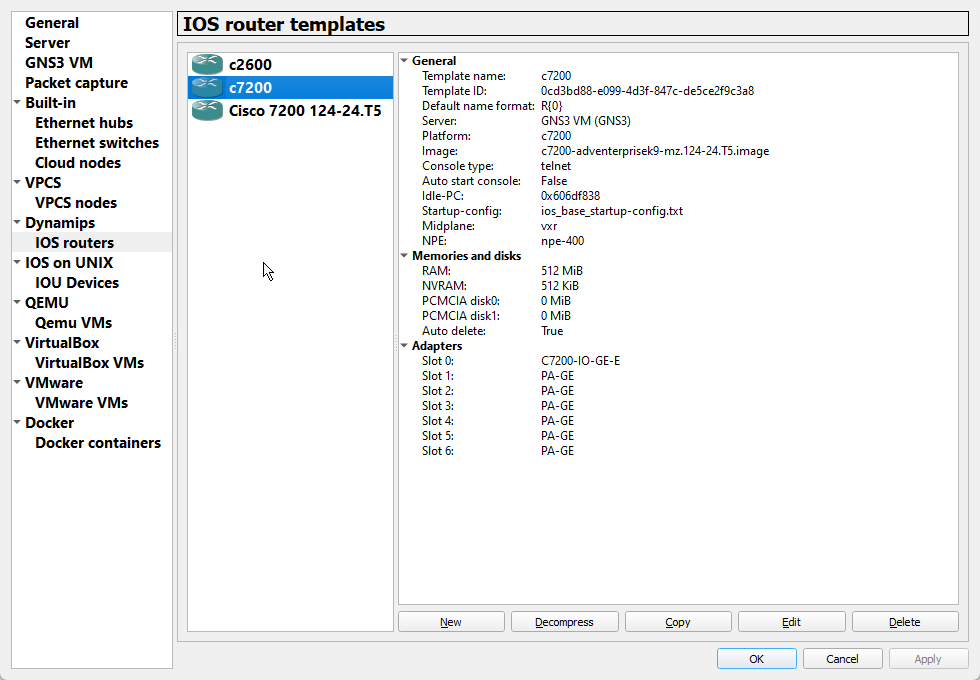
It is very easy to install a Cisco image into Gns3, all you need to do is to go to the preferences tab and to to select either ios devices or ios routers like so
Cli #
TBD
Labs #
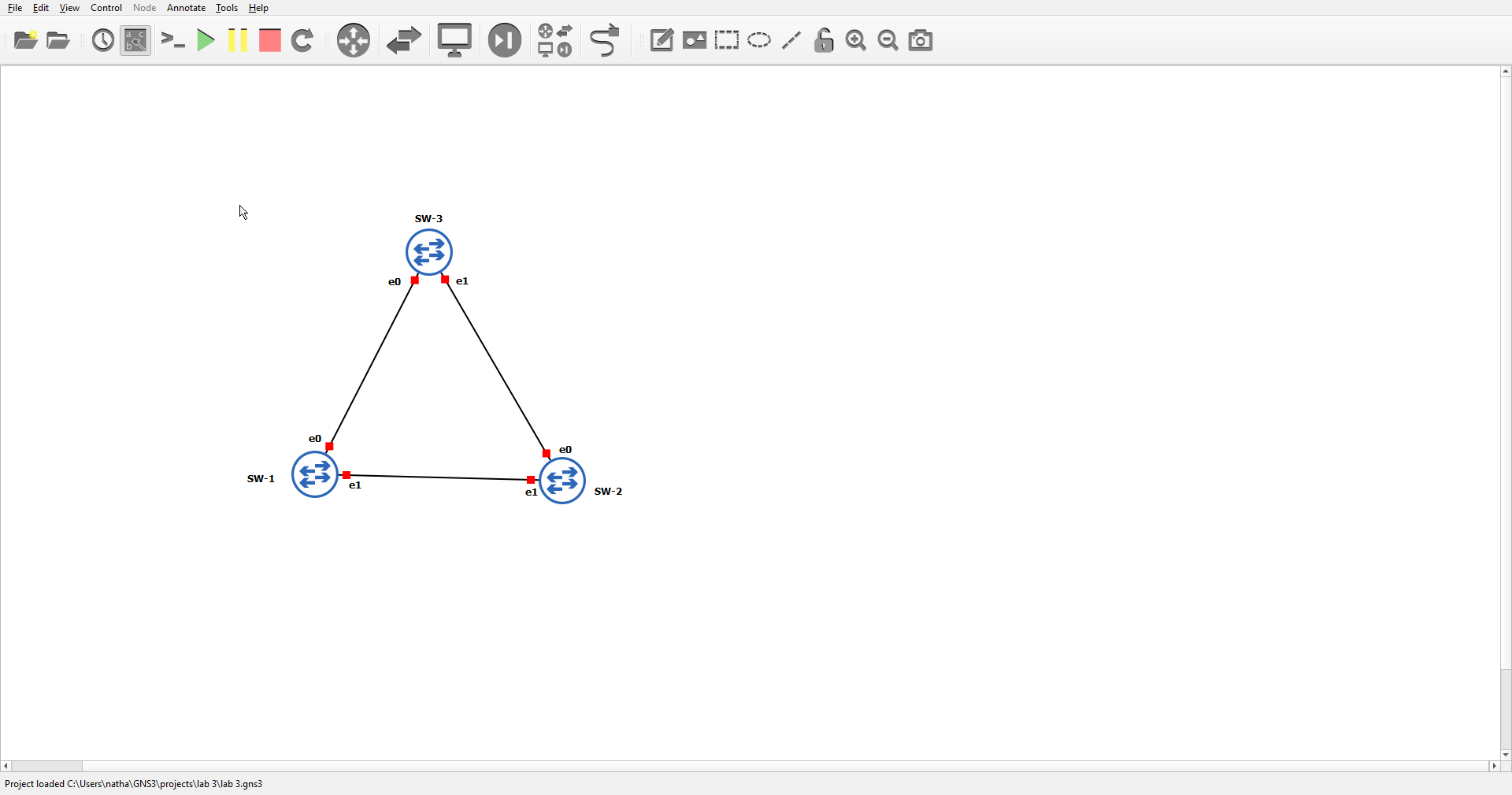
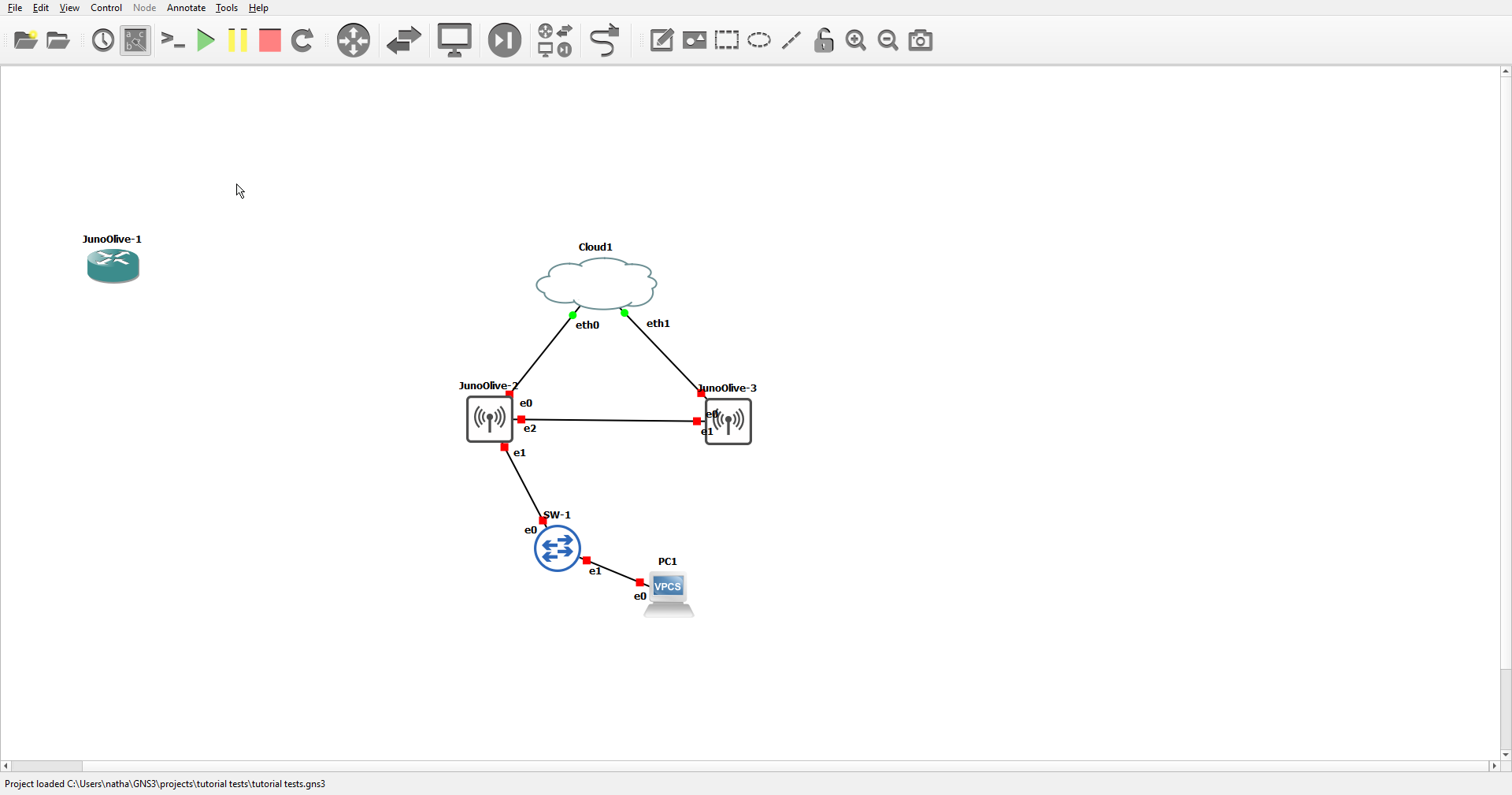
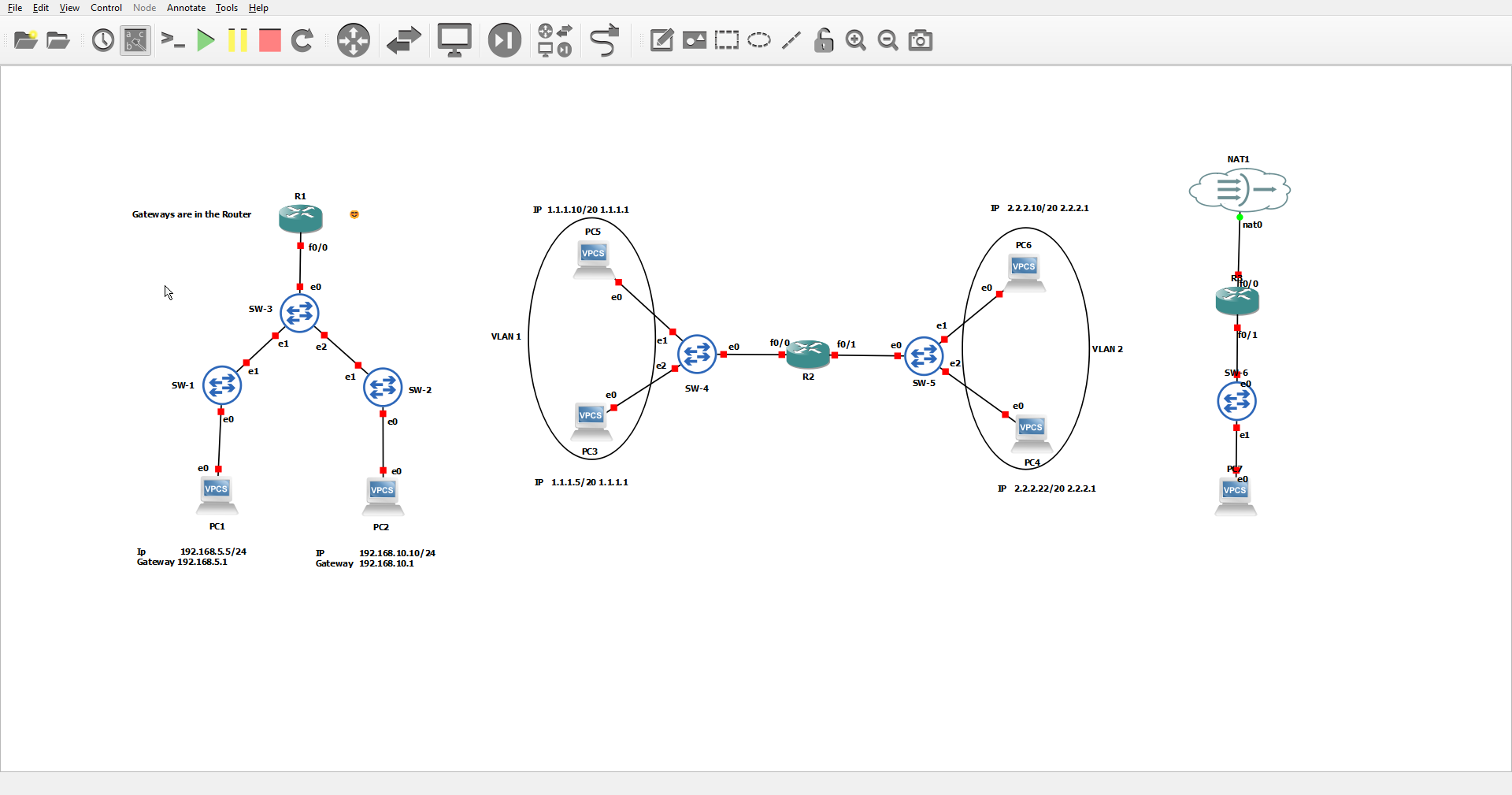
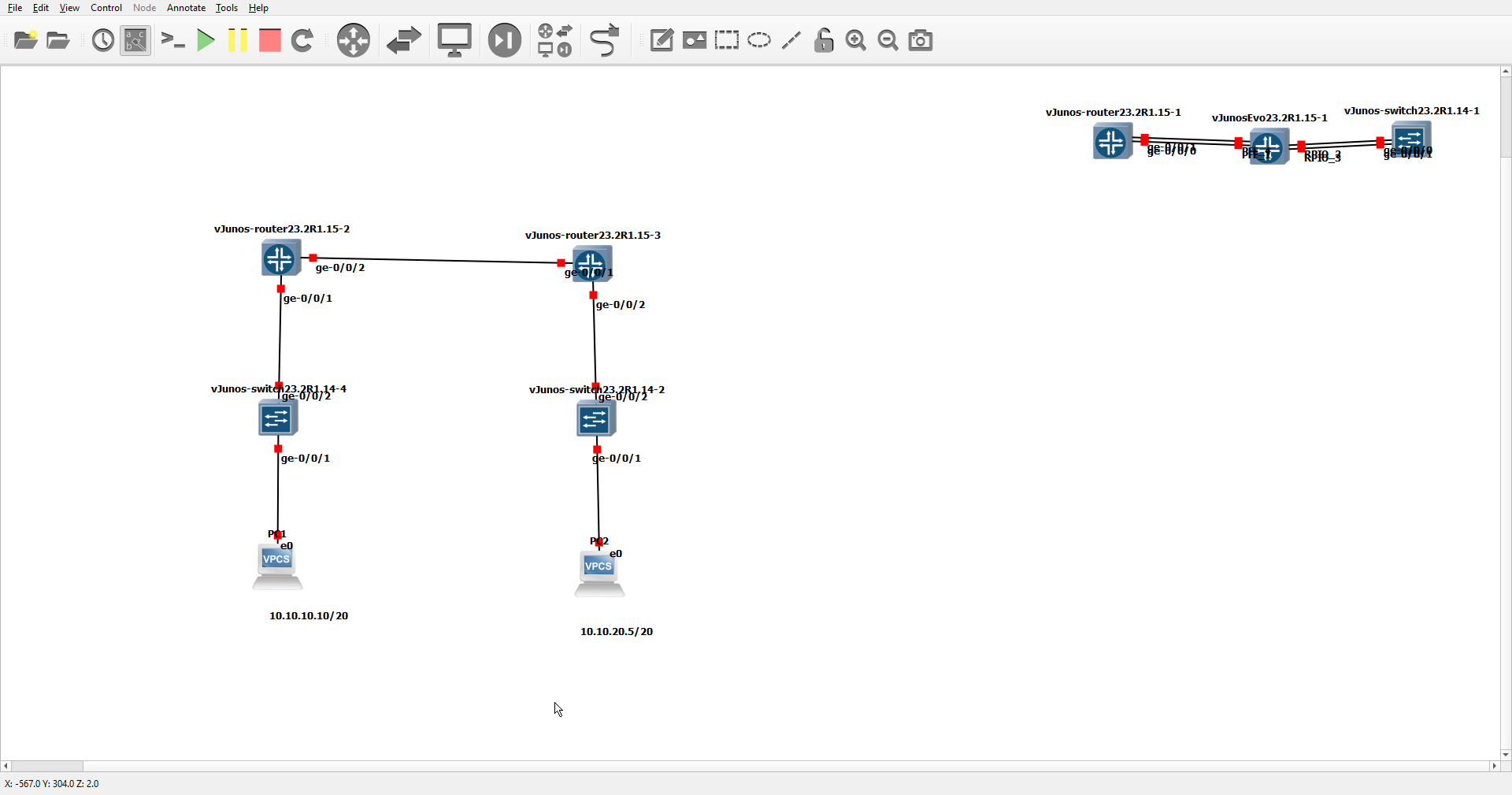
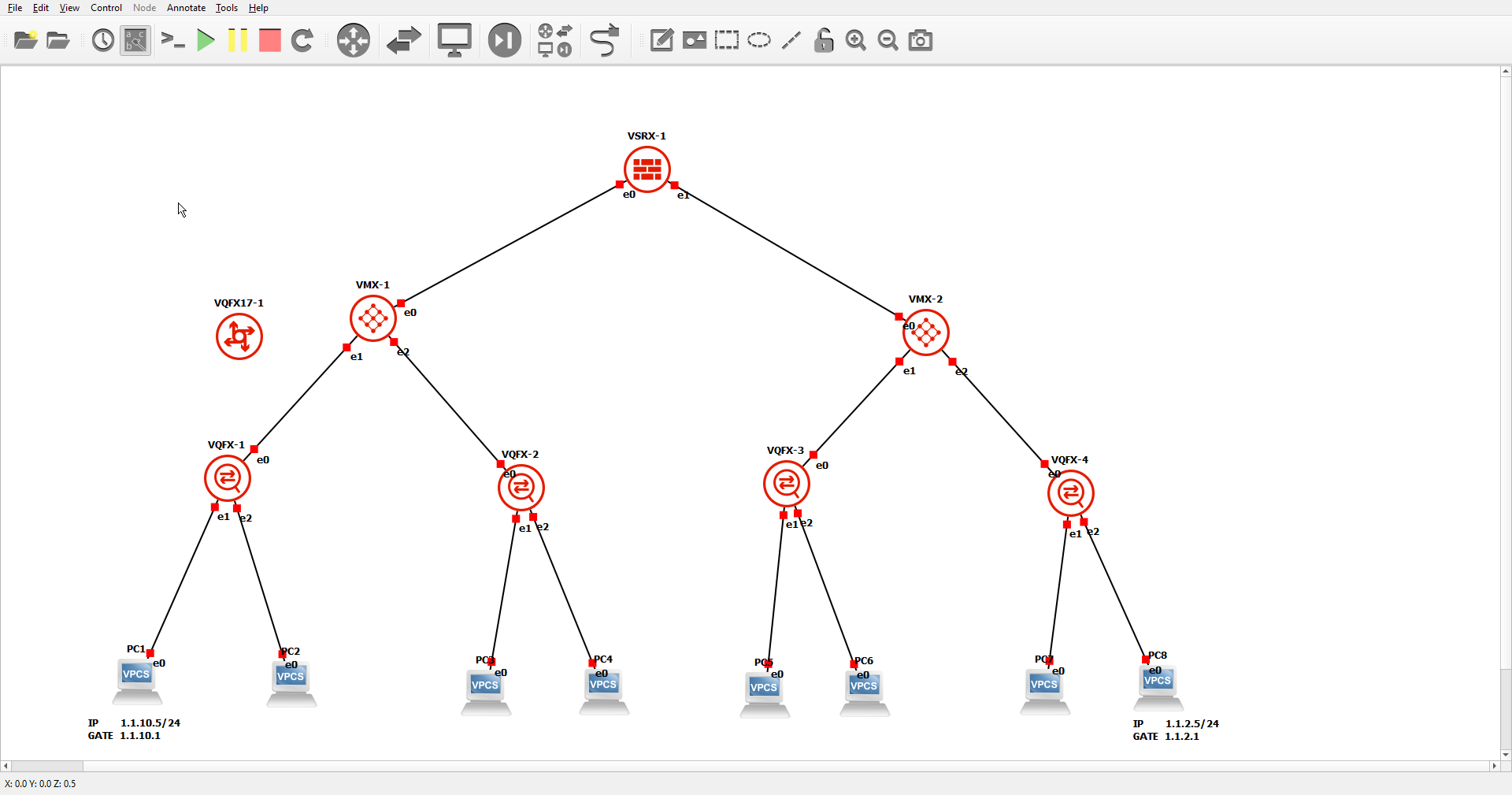
Here are some simple labs that I have done using both Juniper and Cisco.
Cisco Labs #




Juniper Labs #
My Final Thoughts on the two #
I prefer Cisco to Juniper when using Gns3.
